3D models can be created in many different ways and methods. Overall, models are created using different 2D shapes and polygons which are altered to take form of something that the user wants to model. The polygon count in a model can be altered, where as the more polygons in a model will overall produce the model in an overall higher quality.
Polygonal Modelling
This is the process of using individual 2D polygons to overall obtain a clean, smooth and high quality model of an object, item or character. Polygonal modelling is a collection of faces, edges and vertices which all join together to create a shape. The polygons can have the amount of vertices changes for different effects that may benefit the user or make the task overall much more simple and less time consuming. The mesh can be created by adding lots and lots of these polygons together, whether they be triangular, quads etc.

http://www.webreference.com/3d/cararra/3.html
This is an image of a mesh for a human head using this method. As you can see, the picture on the right with more polygonal structures looks a lot more smooth rather than the one on the left with less polygons.
Primitive Modelling
Primitive modelling is an easy and popular method as it consists of using different primitive shapes such as cubes, pyramids, cylinders, spheres and 2D primitives like triangles and squares. This technique can be effective and quickly created to create fast structures of characters, items and objects.

http://www.quimnin.info/articles/types-of-3d-modeling/

https://www.3dtotal.com/pages/tutorials/maya/tut/mazertut1_main.htm
In this, you can see how the different primitive shapes have been used to construct this model together. As you can see, the design is fairly simple because it's just the shapes all put together but it looks pretty good for a model that has used the method of primitive modelling.
Box Modelling
In box modelling, you use primitive shapes like cubes, cylinders and spheres to create a basic shape of a model. After you have the structure of the model, then you can start to sculpt into the structure. you can use modifiers like the subdivision tool to make the structure of the model look more smooth and it helps as it smooths the edges in order to get an outcome of the perfect shape for your model.

https://en.wikibooks.org/wiki/Blender_3D:_Noob_to_Pro/Box_Modeling
In this, you can see how this model has been created in a box modelling style as the final structure of the model was created before all of the details and smoothing was added into it which came out with a result like this.
Extrusion Modelling
Extrusion modelling is a very simple yet effective method to use as you can create extremely basic structures and yet make very complex ones. For example, you can extrude a cube to make a room outline or a type of arch which could benefit you very well as you get a nice and clean accurate structure from extruding.
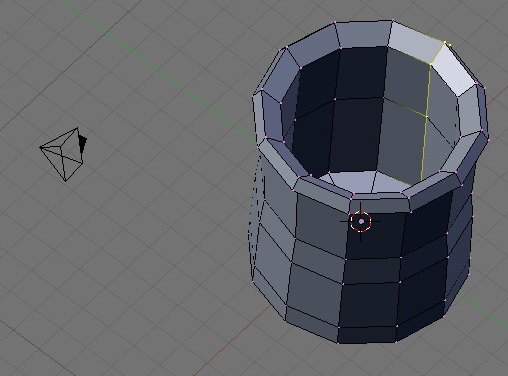
https://en.wikibooks.org/wiki/Blender_3D:_Noob_to_Pro/Modelling_a_Mug_using_Spinning_and_Extrusion
As you can see, this is a model that has been created by extruding individual faces. This wouldn't have too a long time to create and you have a nice shape you could use within a level.
Sketch Modelling
In sketch modelling, You use a program to sculpt/ sketch a model whilst you have precise accuracy of what you want the model to look like. You can use additional hardware; such as Drawing tablet to apply extra detail to the model. I like this method because it gives you more freedom to draw the model how you want it to look and you can add your own specific details without having to mess about.

http://pixologic.com/zbrush/features/decimation/
In this image, you can see how this model has been used in the program ZBrush and you can see all the extra little details that has been sculpted into this. If you were to use a different modelling process, it would be very difficult to get the same outcome as this as this was done precise by sculpting whilst the other methods consider to use more time and extruding etc.
3D Scanners

This image shows how a 3D scanner is used. It is a handheld device you can maneuver around an object, person etc. When you have scanned your object, the data that gets collected can be used to create the 3D model.

No comments:
Post a Comment