Constraints Polygon Count and File Size A Polygon Count is the amount of polygons that are rendered per frame. The polygons that a GPU can see are polygons that do not have more that 4 sides, which means that the polygons counted are triangular and quads. The more polygons that are in a model, then the model is most like going to look a lot more smooth because the adding more polygons give the structure a better flexibility. A game model can have barely any polygons for a simple model like a a table but then a really complex design like a character or animal could have over 40,000 triangles in it because they have helps the model gain its overall structure and shape.
This image shows how the number of polygons can change how the model you have created can look as increasing the amount of polygons will smooth the edges of your design and it will make it look like it has a higher quality.
The file size is a fairly important aspect using games, because if the file size is too big, it can cause issues such as lag, crashes, render time, transfer time, storage and more. This is why the games industry aims to create assets that contain less adjustments as it increases file size which could cause many issues in the future. The file size increases when more things are added to a scene, such as mesh, assets, modifiers, polygons, pretty much anything extra. The amount of vertices and faces used within a project is the most common thing to increase the file size of a project in a program such as Blender.
This shows how big files can actually be as we are familiar with names such as Kilobyte, Megabyte, Gigabyte and Terabyte. Rendering Time
Rendering Times can vary whilst modelling, as it depends on a lot of the assets you put into the project. For example, if a model I created had a low polygon count and it wasn't too developed, it would pretty much render instantly, even if it was on a low spec PC. However, if the polygon count was increased, then the system will struggle to render the image or environment as well because the amount of polygons will make the system lag since it increases the file size. The outcome can also be changed depending on what specifications you have in your PC. Since the rendering is mostly focused on your GPU, then you will most probably will want a good GPU such as a GTX750ti and upwards. A better GPU will increase the time as they run at faster rates than the CPU and they are created so speed things up such as rendering models, videos and in game environments. Other things that could cause the rendering time to increase is using high quality textures and lighting, which can go up to pretty large scales. Then this texture is repeated onto another part of the geometry and so on, which will result in increasing the file size and then that means that the GPU has more of a job to complete.
Here is an image showing that the GPU is rendering each and every single one of these frames so that it can process and project the video in the quality that you have selected.
3D Studio Max was developed by Autodesk Media and it is a professional 3D software for animations, rendering, and modelling. This Program allows you to do many different things as it contains many features such as: character animation and rigging tools, animated deformers, mesh and surface modelling, dynamics and effects, shader effects, lighting simulation and analysis, texture assignment and editing and many different camera angles for better perspectives. It is used for a wide range of the media such as video games, TV shows, architecture studios etc.
Here is a short animation created with 3D Studio Max which shows some of the things that the programs offers to you such as fluent animation and great lighting effects.
Maya
Maya was developed by Alias Systems Corporation, and it is a 2D and 3D graphics software used to create digital graphics and 3D models used in media like video games, animation, TV etc. Maya is available on Windows, Linux and Apple, which is great because it doesn't limit the user to who can use this program or not as a lot of software is only available on Windows. Maya is one of the more popular software because of the features it offers and the overall stability and controls. It has features such as dyanamics and effects, deformers, general animation tools, natural character creation, surface modelling and much more.
This is the intro animation used for the Witcher 2, which was a popular game that was released back in 2011. Maya was the program used to create this animation and as you can see, everything looks amazing whilst looking into everything in detail, from textures to lighting etc.
Witcher 2 Intro Animation
Lightwave
Lightwave is a 3D graphics software and it is used mainly for rendering 3D images, both animated and static. The rendering engine that is included with it supports advanced features that a lot of other software do not have like realistic reflection and refraction, radiosity and caustics. It has bveen used in film and TV series to create special effects as well as being used in video games for motion graphics.You also have the ability to control the animation by manually reverse and forwarding it and this will help gain better precision and fluency for a better outcome of animation.
Here is a video demonstrating how to create realistic water, which as you can see from the end result look amazing as the quality is high, the reflection are amazing and it just looks like real water that you would see in real life.
Blender
Blender is a free and open-source 3D computer graphics software product used which is very good at making things like models. It's a program I have used in my assignments as I have learned how to use it and how to create things, mainly models and sculpting. It was fairly easy to use and I had the ability to use features such as UV wrapping, texturing, rigging, skinning, particle effects, animating, match moving, camera tracking, rendering and much more. Blender is also good for making things like cutscenes, video games and also special effects for things like films and TV.
This is a video of somebody modelling the head and face of an anime character. The video is sped up x20 but you can see how every little thing that he did up to the stage where he finally completed and you can see that the model is high quality and in full colour with nice lighting effects.
Cinema 4D
Cinema 4D is a 3D modelling software which has many features available for the user to use. You can model, animate, texture, rig and the controls are fairly simple to get the hang of. The program was developed by MAXON and it is capable of modeling, animating, lighting, texturing, rendering and most of the things that all of the other 3D software has to offer.
This is a video showing how Cinema 4D
ZBrush
Zbrush is a digital tool that combines both 3D and 2.5D modeling, texturing and painting. It is used to sculpt high-resolution models since the program allows you to use up to 40 million polygons. ZBrush is most known for being able to sculpt medium to high frequency details and also be painted precisely. You can create different types of maps such as bump maps and normal maps to change how the surface of the model looks which is very useful for objects that are in games, movies and TV. When you have completed your model, you have the option to make it into a 2.5D image by placing the model on a 2D flat background or you could on another 3D model in the same scene which also could be very useful.
This is a video demonstrating how to create a realistic looking eye using the ZBrush software. After watching this video, I can see the amount of detail you can actually put into the models and how precise you can make the model look overall both on the sculpting and painting side.
Sketchup
Sketchup is a 3D modelling program which is mainly used for creating films and video games. It has a lot of different and unique features to offer and it is also cost free. There is a version that has some extra functions to benefit the user on the professional edition which costs money but you're getting better products to create better things with. The application is useful for drawing layouts manually using equipment such as drawing tablet which could be good as you get more precision in whatever you are going to create. The software itself includes drawing layout functionality which can help to adjust certain options such as drawing scales, line weights, add dimensions, callouts etc.
This is a video showing a house model that was created using this software and this instantly shows you how useful this program can be as you can do all sort of different things using your own mentality and precision which is something that I definitely like about this application.
File Formats
There are an absolute tonne of file formats for different programs and uses, which is completely understandable because they all pretty much have a different purpose of what they do and what they have the potential to do. For example, images can use formats like '.png' and '.jpeg' but if you were to change the format to '.OBJ' it would just run into errors. However, some formats can be used on multiple programs so they can practically collaborate with each other and do work using 2 different pieces of software. For example, both Blender and Unity can export in '.OBJ' formats which means that they can both be used in each of the programs without any errors.
3D models can be created in many different ways and methods. Overall, models are created using different 2D shapes and polygons which are altered to take form of something that the user wants to model. The polygon count in a model can be altered, where as the more polygons in a model will overall produce the model in an overall higher quality.
Polygonal Modelling
This is the process of using individual 2D polygons to overall obtain a clean, smooth and high quality model of an object, item or character. Polygonal modelling is a collection of faces, edges and vertices which all join together to create a shape. The polygons can have the amount of vertices changes for different effects that may benefit the user or make the task overall much more simple and less time consuming. The mesh can be created by adding lots and lots of these polygons together, whether they be triangular, quads etc.
http://www.webreference.com/3d/cararra/3.html
This is an image of a mesh for a human head using this method. As you can see, the picture on the right with more polygonal structures looks a lot more smooth rather than the one on the left with less polygons.
Primitive Modelling
Primitive modelling is an easy and popular method as it consists of using different primitive shapes such as cubes, pyramids, cylinders, spheres and 2D primitives like triangles and squares. This technique can be effective and quickly created to create fast structures of characters, items and objects.
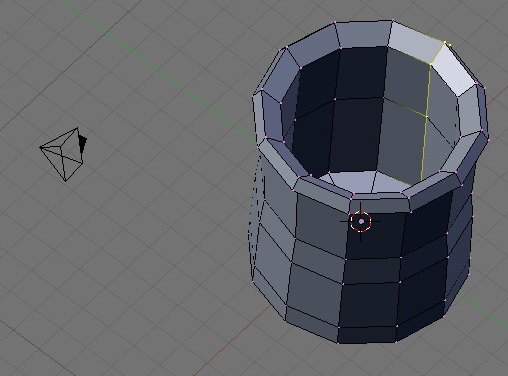
In box modelling, you use primitive shapes like cubes, cylinders and spheres to create a basic shape of a model. After you have the structure of the model, then you can start to sculpt into the structure. you can use modifiers like the subdivision tool to make the structure of the model look more smooth and it helps as it smooths the edges in order to get an outcome of the perfect shape for your model.
https://en.wikibooks.org/wiki/Blender_3D:_Noob_to_Pro/Box_Modeling
In this, you can see how this model has been created in a box modelling style as the final structure of the model was created before all of the details and smoothing was added into it which came out with a result like this.
Extrusion Modelling
Extrusion modelling is a very simple yet effective method to use as you can create extremely basic structures and yet make very complex ones. For example, you can extrude a cube to make a room outline or a type of arch which could benefit you very well as you get a nice and clean accurate structure from extruding.
In sketch modelling, You use a program to sculpt/ sketch a model whilst you have precise accuracy of what you want the model to look like. You can use additional hardware; such as Drawing tablet to apply extra detail to the model. I like this method because it gives you more freedom to draw the model how you want it to look and you can add your own specific details without having to mess about.
http://pixologic.com/zbrush/features/decimation/
In this image, you can see how this model has been used in the program ZBrush and you can see all the extra little details that has been sculpted into this. If you were to use a different modelling process, it would be very difficult to get the same outcome as this as this was done precise by sculpting whilst the other methods consider to use more time and extruding etc.
3D Scanners
This image shows how a 3D scanner is used. It is a handheld device you can maneuver around an object, person etc. When you have scanned your object, the data that gets collected can be used to create the 3D model.
What are the fundamental principles behind the creation of virtual 3D space? Describe and explain 3D geometry.
Remember that you are trying to comprehensively explain the theory and applications of 3D with elucidated examples and consistently using subject terminology correctly.
Geometric Theory
Geometric Theory is a way to model objects or characters within a game. An initial mesh is put through a design process which gives the basic shape of an item or object which can be adapted with different types of textures. The mesh is created using the process of combined polygon, which have 3 key components; A vertice, an edge and a face. When another vertice is added, then a basic triangle polygon is formed with a face, which is also the most simple version that a polygon can become. Extra vertices can be added to create a shape called a quad which has 4 edges in total, which can continue to get more edges in total such as 8, 12, 16 etc.
This process is important because it is used almost always to model assets for a game, whether it be characters, items, objects etc. This process helps make create the models more precisely, as the polygons within the shape itself can be altered to changed to overall look more like the model you want to create with a smooth and realistic effect. Overall, the model is just 2D polygons stuck together and this helps model the structure more precisely as the vertices, edges and faces can be changed.
As you can see, this dolphin model has been created using triangular polygons. The polygons have been moved and distorted to obtain the right shape for the model and we can see how the triangles have allows this model to be created as the individual polygons can be moved and streched.
https://joedenny.wordpress.com/year-1/unit-66-3d-modelling/introduction-to-3d-modelling/
This is another model created but quad polygons have been used rather than triangular polygons. As you can see, each polygon has been altered to form the structure of a rhinos body as the 2D shapes have the ability to bend and become a 3D shape because each 2D shape is connected and working with each other,
Task 2 - Displaying 3D Polygon Animations API
An Application Program Interface is a set of functions that allow the user to create different types of programs which access the features or data of an operating system, application, or other service. A good API can make it easier to create and develop a program because it basically sets the whole thing up ready for a programmer to configure. The API allows different people to write code for the programs so that they can be used for different sorts of operations which is important because it basically puts all of the game you've created together into one. For example, Direct3D is an API used within different software as it manipulates and displays the 3D objects.
Graphics Pipeline
A graphics pipeline is the process of having a 3D scene that has been build on a 3D modelling software get rendered so that a 2D raster version of a 3D scene. This is important because it it makes the computer display the 3D model on the screen. Without this, you would be able to see the graphics within a video game and this is essential because we need to see the graphics. If the graphics is improved, then the in game graphics are most likely to improve as well.
Here is a diagram showing the steps of how the stages of the Graphics Pipeline progresses.
Rendering Process
In the rendering process, the CPU commands the GPU to render specific things so that everything comes out in high quality without any visual glitches. Things rendered in the process are things such as textures, shadows, lighting, luminosity and radiosity. The image generates is from a 2D or 3D model using application software as things like models which are obviously used within video games. Rendering can take a long time to completely finish but it all comes down to what is in your project, as if your file size is reasonably low, then it probably won't take a long time to finish but if you have different materials and assets within your renders views, then the chances are that the project will take a longer time to finish rendering.
As you can see, this is a fully rendered model of a car, that has been smoothed out to an extent and it has been fully coloured and textured. You can see how much detail is in this render as the model itself would of had a lot of detail and polygonal count within it in order to get the model looking so realistic and generally amazing as it almost looks like a real car.
3D is used pretty much all the time in modern day since we have the technology that is powerful enough, whether this is using the different medias such as: Video games, Films, Movies, TV shows etc. However, back in the day when the technology wasn't really as strong or developed as it is nowadays, the 3D process of creating a video game was completely different by how we see the perspective of 3D today. 3D in Video Games
3D Monster Maze
Back in 1981, A game called "3D Monster Maze" was the first ever game released on a commercial games machine in 3D. As you can see, the perspective of 3D we see now is much more realistic and clear to define but after looking at some game play, you start to see the 3D that has been implemented into the game using a 2D pixel-type of effect. I think that back in the time that this was released, people that played this game would have been shocked and amazed since there was no game that gave you the same 3D experience and the objective of the game seemed pretty fun too as it was too basically try not to get caught by the tyrannosaurus-rex. They also used 16x16 cells, which again shows how much further behind we were in technology then as now, we pretty much experience every single step.
Here is a a video showing game play of "3D Monster Maze" showing how the graphics actually looked and how the game play proceeded.
Spyro the Dragon
Spyro the Dragon was released in 1998 and you can see just from this video how much the games had developed and become a lot better, especially in the term of 3D. In this game, you control Spyro who is a dragon and you can freely move around using him. I like this because you can see the 3D around you with your own control and you can see how much more improved it looks. Even if some of the models aren't the best looking graphics wise, we can still see how much more the games industry improved overall. This was released on the PS1.
Tekken 5
Tekken 5 is a fighting game that uses a perspective in a 3D term. This game was released in 2004 so you can see that things like character models started to improved. The game focuses mostly on mechanics, since it is a fighting game and I like how the 3D type of perspective has been used such as how the environment around the fighters looks and the special 3D effects created. The platform that this was released on was PS2 which means that the console itself could handle heavier textures and models.
Pokken Tournament Pokken Tournament is a game that is a cross between characters from Pokemon and the fighting mechanics from Tekken. I love how game functions thanks to the mechanics implemented by the creators of Tekken but think my favourite thing about this game is how amazing it looks. I love how the 3D perspective takes place within the game as you can cycle round the arena-like area and you can see the Pokemon and surrounds in a 3D term and I think it looks very appealing to look at. The textures perfectly fit onto the models and it is a big improvement since the other game's that were released on the wii such as Pokemon Battle Revolution.
3D in Film and TV
Shrek 2
In Shrek, the 3D used it pretty much everywhere. I think that the 3D aspect works very well with Shrek as a whole and I think that things such as the models for characters, environment and objects look very good as they are high quality and they look smooth. It also amazes me how good the characters look with the models and the textures work very well with the film as a whole.
Scooby Doo: The Movie
Scooby Doo: The Movie has multiple things in it animated, such as Scooby himself, the monsters and special effects. I love how Scooby is animated as you can tell that effectively he is a 3D model but it just works so well with the movie and I think it represented how Scooby would be and act within real life which I think is awesome. I also like how the monsters are portrayed within the film also because the models look very high in quality and they almost look realistic.
Garfield: The Movie
Garfield: The Movie, is something that I have re-watched time and time again when I was younger. Looking back at it, I'm amazed at how great Garfield was animated in the film as the animation is fluent, it looks good and it's high quality. Even the animation with his eyes look cartoon-like but realistic at the same time which is something that I think looks really good, appealing and is very effective.
3D in Education
3D can be used in many different ways for education. We can use it for things like the body, such as where body parts are located or we could go even further in depth to learn how the different types of blood vessels work.
Here is another image that shows ho w education can be contributed through using 3D models/ structures. This shows us how the earth is structured and I think that the 3D helps as it shows precisely that it is the earth and the colour goes dark as it goes into the middle which I also think is good. 3D in Medicine
In this image, you can see how 3D software can be used to display the inside of somebody's mouth or area in the body so that they can find a solution to fix the problem. The 3D model allows the doctors/ nurses to have better perspective and angles to get extra and precise information so that the proceedure can continue. This leads onto 3D printing, which is medically used to create things such as artificial body parts and organs for people that need them. This is very useful because this can save the lives of people just because of the 3D software and artificial parts which is amazing in my opinion.
This video shows that a 3D printer can be used to create artificial bone that acts exactly like bone as it feels like it, it acts like it, it looks like it but its actually not bone and does the same job. This could be life changing for people because if bone could be created and used again for people that have lost bone, then they wouldn't have to suffer the after effects and consequences if it was something like a severe fracture or disease etc.
Here is another example of 3D printing being used. In this image, we can see that the person has a 3D printed prosthetic hand which is very useful as since it is 3D printed, it is very cheap and it seems to be quite reliable.
3D in Engineering
3D in engineering can be used to create new parts, find solutions etc. This is useful because it could save a lot of money and time trying to manually figure out what could be wrong with an electronic or a car whilst a 3D model could be created digitally and they could already have a solution. Models of things such as cars can be created also to benefit an engineer so that they know exactly what they are doing and they could save time and money which is very good. 3D in Architecture http://www.icreate3dmodelling.co.uk/3D-architecture_renderings_artist_impressions.htm
3D in architecture could be useful in many ways. It plans out the structure of how a house or building will look in the finished product, which will help guild builders what to create and how to create it like exactly. This is important because it could effectively save money, and it makes the whole process a tonne more easy with less errors to be committed which could cost money and time if they were to proceed. 3D in Product Design
Here is a good example of what 3D product design would look like. As you can see, its a 3D model of a camera which could be very useful as its structure has been created before the product has even been made which means that when the product is going to be made, then the makers know what to do and they also know exactly how they want the product to look like in the final outcome.
To evaluate this assignment, I think I have complete the task to a fairly high standard. I think that this Unit overall has been the most difficult one and I think that I have put the most effort into this out of all the assignments. This has been a very fun unit as I have been able to experience a lot of new things and I think I like the process of models and all of the different techniques I could use to create one. I have enjoyed making my own models and equipment using my own mindset of how I wanted everything to look and I think that I have overally done well and I am quite pleased with the outcome. However, I think that if I put more time and dedication into my models, I could have made them look so much better in detail and precision, as some of my work was rather rushed but still completed up to the standards. If I were to do this unit again, I would definitely invest my time into doing more with the modelling process as I thought that it was very time consuming and you needed precision and accuracy to create the perfect model. I think now I am used to using the different software and what not, I think that I could create my models now in a faster time with better expectations and higher standards.
Overall, I think that I have done a good job on this unit and if I were to do it again, I would take my time with the tasks to make sure I was doing everything correctly without running into any errors and I would also like to spend my time producing better work in general as I have the feeling that if I were to redo this unit, I would do a lot better.